Credits, the spending limit and topping up
The meter at the bottom of the left rail. What it counts, when it resets, and what happens when you reach the limit.
Runs cost credits. The meter at the bottom of the left rail is the running total, and clicking it opens the panel below.
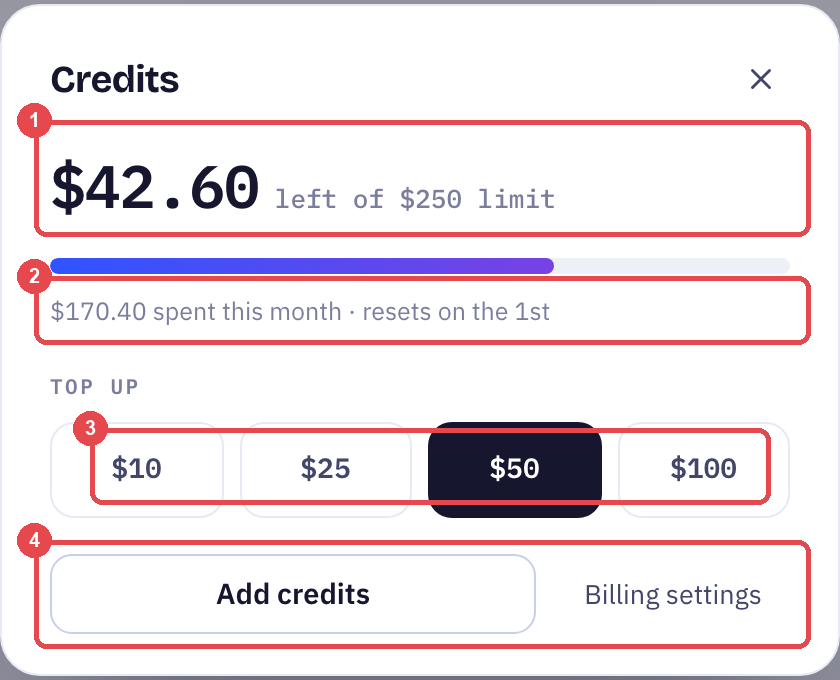
The figures in this screenshot are the demo workspace's. Your allowance and prices are on the pricing page and explained in Billing and usage.
Balance and limit
The large number is what is left. "Left of … limit" is the cap you set — the point past which runs pause rather than keep spending. The limit is yours to raise or lower in billing settings.
The month
"Spent this month · resets on the 1st." Spend counts from the 1st and returns to zero on the next 1st. The limit does not carry over; neither does unused allowance.
Topping up
Four fixed amounts, then Add credits. A top-up is available immediately and is spent before the next reset.
Reaching the limit pauses AI replies — that is what a limit is for. If you would rather never pause, raise the limit rather than topping up repeatedly; a top-up buys credit, it does not move the cap.
Billing settings
Card on file, invoices, the limit itself, and the plan. Billing settings in the panel opens it.
Billing and usage for what the setup fee and retainer cover, what is included each month, and how usage above the allowance is charged.
Frequently Asked Questions
What actually costs a credit?
A run. Longer runs and larger models cost more; the Dashboard shows cost per run and spend by model so you can see where it goes.
Does a top-up change my limit?
No. A top-up adds balance; the limit is a separate cap you set in billing settings.
What happens to unused balance on the 1st?
Spend resets to zero. Balance you topped up is still yours; the monthly allowance itself does not roll over.
Up next
Billing and usage
What the setup fee and monthly retainer cover, what is included each month, and what happens when you go past it.
Still need help?
Our team is available Mon–Fri, 10 AM–6 PM MYT (GMT+8).