Building a report board
Tell Bob what you want to see and it builds a reusable dashboard. Here is how boards, folders and templates fit together.
A dashboard is a board of cards the agent writes from your run logs. You do not configure charts; you ask for a metric and a card appears.
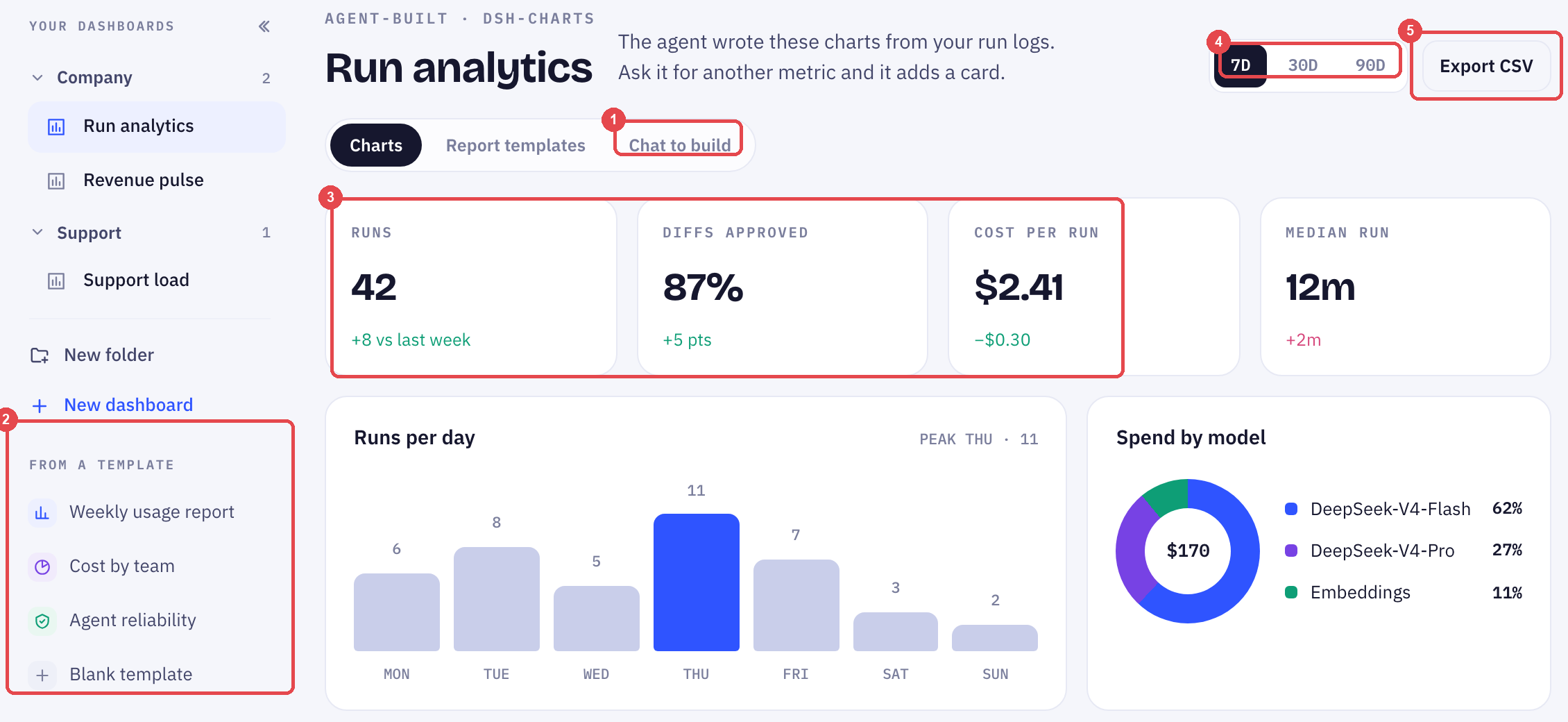
Boards and folders
The left column lists your boards in folders — a Company folder, a Support folder. New folder and New dashboard sit under the list. A board belongs to one folder; move it by dragging.
Starting a board
Two ways.
From a template. Weekly usage report, Cost by team, Agent reliability — or Blank. A template is a board with its first cards already asked for.
By asking. Open a board and click Chat to build. "Show me runs per day for the last 30 days, and which templates were busiest." Each request becomes a card.
A board marked Agent-built was written by the agent from your run logs. Ask it for another metric and it adds a card rather than replacing one.
Reading a board
The top row is stat tiles — runs, diffs approved, cost per run, median run — each with its change against the previous window. Below them, charts: runs per day, spend by model, credit burn, busiest templates.
Switch the window with 7D / 30D / 90D. Every tile and chart re-computes for that window, and the "vs last week" deltas move with it.
Getting the numbers out
Export CSV on any board downloads the data behind every card in it. Use it when someone needs the figures in a spreadsheet rather than a picture of them.
Cost per run and credit burn are the two cards to keep on your first board. They are what the credit meter is summarising.
How to tell whether it is working covers what to measure. This page covers where to look.
Frequently Asked Questions
Can I edit a card the agent wrote?
Yes. Open the card and change the question. The agent rewrites the chart from the new one.
Do boards update on their own?
Yes — they read the run logs, so a board is current whenever you open it. Nothing has to be refreshed.
Can I share a board with someone who is not in the workspace?
Export it as CSV. Boards themselves are inside the workspace.
Up next
Connected tools
The Integrations view is one table of where customer data comes from and where results go. Here is how to read it.
Still need help?
Our team is available Mon–Fri, 10 AM–6 PM MYT (GMT+8).