The skills library
What a skill is, how the library is organised, and how the agent drafts new skills from things you ask for repeatedly.
A skill is one thing the agent knows how to do — read a file, search the web, open a pull request. Workflows are assembled from them. The Skills view is where you see what the agent can already do, add to it, and approve what it has learned on its own.
Learn automatically

Ask for the same thing three times and the agent drafts it as a skill, then waits for your approval before using it. It learns from your last 30 sessions, so a habit you formed last month still counts.
Nothing drafted runs on its own. Until you approve it, a drafted skill is a suggestion, not a capability.
The counter on the card — "1 waiting for your approval" — is worth glancing at weekly. An approved skill is a workflow step you never have to describe again.
The library
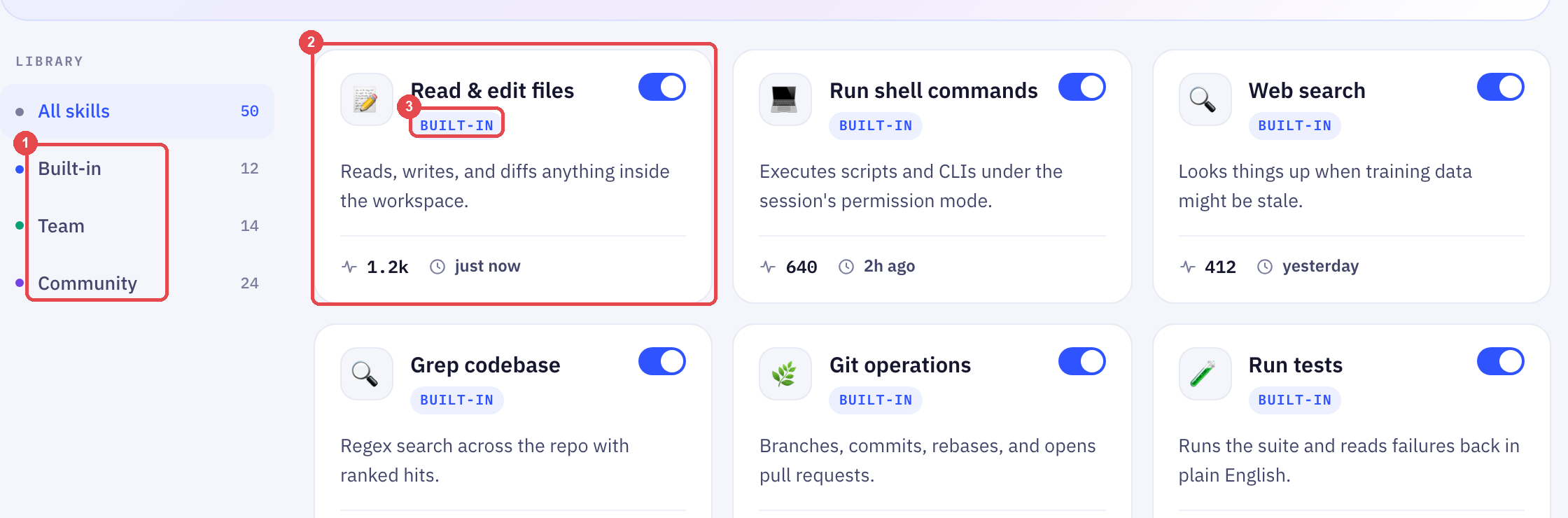
Three groups, filterable on the left:
| Group | What it holds |
|---|---|
| Built-in | Ships with the agent: read and edit files, run commands, web search, git, tests, PDFs and so on |
| Team | Skills your workspace has added or approved |
| Community | Skills shared by other workspaces |
Each card shows a run count and a "last ran" time. A skill that has never run in a month is a candidate for removal; a skill that runs hourly is one to protect.
Adding a skill by hand
- Click New skill in the top right
- Describe what it does, in plain words
- It lands under Team, and workflows can use it from the next run
Customising your AI agent covers tone and guardrails, which sit above skills — a skill is what the agent can do, settings are what it may do.
Frequently Asked Questions
Does a drafted skill ever run before I approve it?
No. Learn automatically only drafts. The switch on the card turns drafting off entirely if you would rather add every skill by hand.
Can I see what a community skill actually does before enabling it?
Yes — open the card. The description is the skill's contract, and the run count tells you how many other workspaces trust it.
Why do the built-in skills look technical?
Because they are the primitives everything else is built from. You will rarely call "Run shell commands" yourself; a workflow does, on your behalf.
Up next
Running a workflow on a schedule
Timed runs live in the Scheduled view. A failure shows up here before it shows up anywhere else.
Still need help?
Our team is available Mon–Fri, 10 AM–6 PM MYT (GMT+8).