Connected tools
The Integrations view is one table of where customer data comes from and where results go. Here is how to read it.
Every workflow reads from somewhere and writes to somewhere. Integrations is the one table that shows which systems those are, what flows through each, and whether it is connected yet.
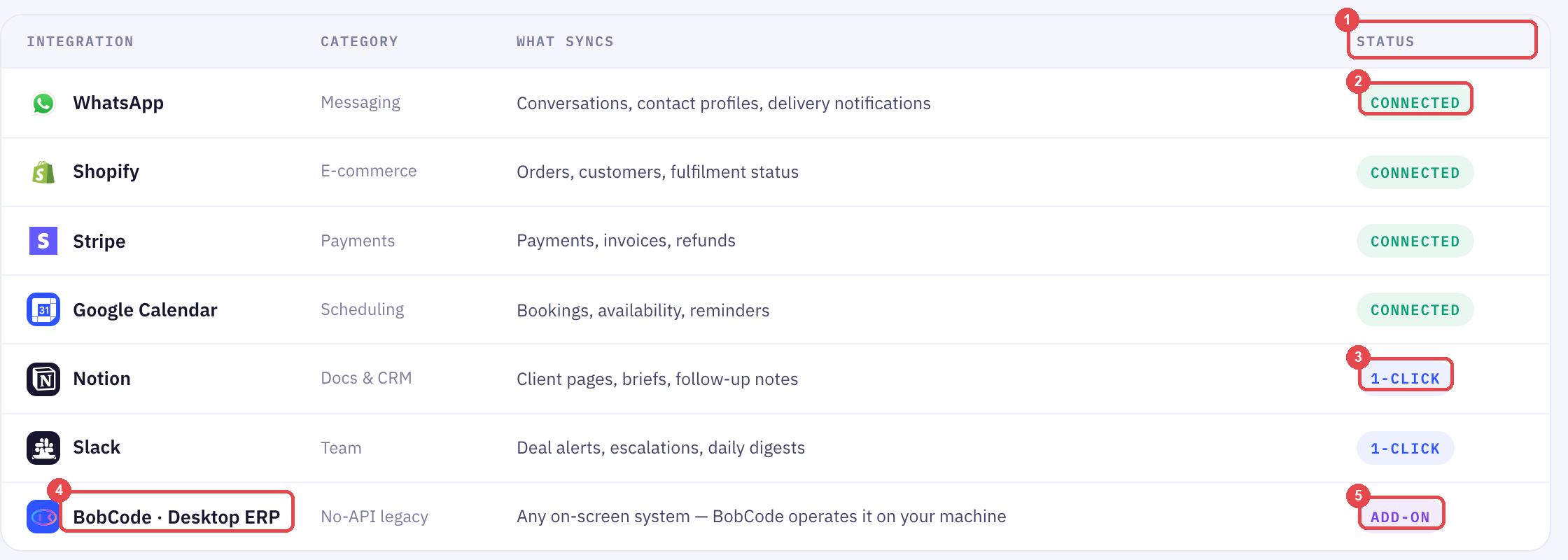
Reading the table
| Column | What it tells you |
|---|---|
| Integration | The system, and its category — messaging, e-commerce, payments, scheduling |
| What syncs | Exactly which records move: orders, invoices, bookings, contact profiles |
| Status | Whether it is live yet |
The "what syncs" column is the one to read carefully. WhatsApp syncs conversations, contact profiles and delivery notifications — not, for instance, your catalogue. Shopify syncs orders, customers and fulfilment status. A workflow can only use what is listed.
The three statuses
Connected. Data is flowing both ways. WhatsApp, Shopify, Stripe and Google Calendar are usually here from day one.
1-click. Available, one authorisation away. Notion and Slack sit here until you connect them.
Add-on. Needs a separate setup — today, that is BobCode · Desktop ERP, which operates any on-screen system on a machine in your office when the system has no API at all.
Connecting your systems explains how a connection is made — direct API, browser extension, or BobCode — and what we need from you for each.
Connecting a 1-click tool
- Click the row
- Authorise in the window that opens
- The status changes to Connected, and the "what syncs" column tells you what your workflows can now use
Connect Slack early even if no workflow needs it yet. Escalations and daily digests are the first things people want routed there, and it is a one-click job.
Frequently Asked Questions
My system is not in the table. Is it supported?
Almost certainly, by one of three routes — see Connecting your systems. Tell us the name and we will say which route and what it costs.
Does connecting a tool cost extra?
Connected and 1-click tools are part of the plan. BobCode is an add-on because it involves software installed on your machine.
Can I disconnect something?
Yes, from its row. Workflows that depended on it will stop at that step and tell you why.
Still need help?
Our team is available Mon–Fri, 10 AM–6 PM MYT (GMT+8).